
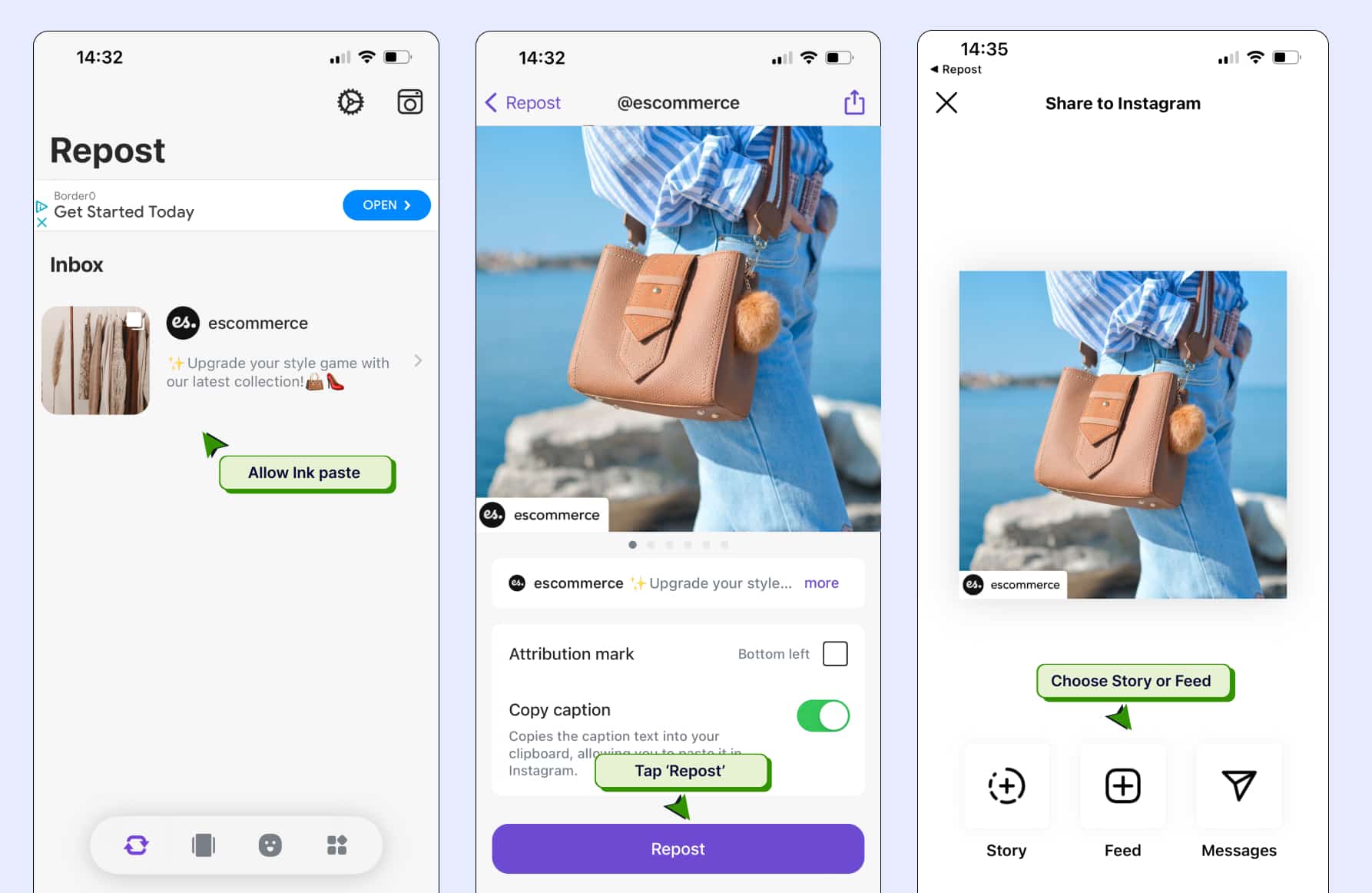
In the dynamic realm of social media, sharing content effectively is crucial, especially on platforms like Instagram. One of the most practical tools that has emerged is the repost tool for Instagram, which allows users to share posts while giving credit to the original creators. This article delves into everything you need to know about repost tools for Instagram, from their importance to the top options available in the market.
What is a Repost Tool?
A repost tool is an application or software designed to help users share content from other Instagram accounts easily. Instead of taking a screenshot or copying content without permission, repost tools enable you to reshare images and videos while maintaining the original post’s credit. This is critical for maintaining community spirit and respecting the effort of content creators on the platform.
Why Use a Repost Tool?
There are several advantages to using a repost tool on Instagram:
- Saves Time: Reposting manually can be tedious. A repost tool streamlines this process, allowing users to share content quickly.
- Maintains Credibility: By giving credit to the original creators, you preserve your integrity and respect the efforts of others.
- Increased Engagement: Sharing quality content from other users can lead to increased engagement on your profile as your audience appreciates varied posts.
- Content Curation: A repost tool helps curate a feed that resonates with your brand while engaging with the broader Instagram community.
Top Repost Tools for Instagram
With numerous repost tools available, some stand out due to their features and user experience. Below are some of the best repost tools for Instagram:
1. Repost for Instagram
This app allows users to repost photos and videos while giving credit to original users. It features a simple and easy-to-use interface, supporting both Android and iOS devices. Users can copy the URL of the post they want to share, and the app takes care of the rest!
2. InstaRepost
InstaRepost offers a straightforward way to share posts while maintaining the original caption. It also allows you to repost Stories, a feature that many users find appealing. The app is packed with options that help enhance your Instagram strategy.
3. Regramming
This tool is specifically designed for regramming posts. It offers customization options allowing users to add their touch to the shared content. Regramming also supports hashtags and mentions, ensuring that the original creators are acknowledged, which can help build rapport with fellow users.
4. Repostly
Repostly is another excellent option for iOS users and comes with advanced options like direct Instagram sharing and notifications when someone tags you in a post. It emphasizes user privacy and ensures that your reposting is safe and respects original content owners.
How to Use a Repost Tool Effectively
Using a repost tool effectively requires understanding best practices that ensure your repost aligns with your Instagram strategy:
- Select Quality Content: Choose posts that resonate with your audience and align with your brand message.
- Engage with the Original Poster: Before reposting, consider reaching out to the original creator to ask for permission if necessary. This step can help strengthen your community ties.
- Attribute Properly: Always give credit to the original creator through tags or mentions. This acknowledgment is crucial for maintaining fairness in the community.
- Mix Reposts with Original Content: A successful Instagram profile balances reposts with original posts, ensuring that your feed has your unique voice while also sharing valuable content from others.
Common Pitfalls to Avoid
While reposting can be beneficial, certain pitfalls can hinder your efforts:
- Ignoring Copyright: Failing to credit original posts can lead to accusations of plagiarism and tarnish your reputation.
- Over-reposting: Flooding your feed with reposted content can turn off followers. Maintain a healthy balance.
- Using Low-Quality Images: Ensure that the content you are reposting is of high quality. Low-quality visuals can diminish your brand’s perceived value.
Conclusion
The effectiveness of social media platforms like Instagram often hinges on the ability to share and curate content creatively. A good repost tool for Instagram enhances this experience by allowing users to respect and share noteworthy posts while maintaining their originality. By effectively utilizing repost tools, you can not only engage and grow your audience but also foster a community of like-minded individuals who appreciate the art of sharing. Remember, the key to successful reposting lies in balance and respect for original content creators. So, choose your repost tool wisely, and enjoy the art of resharing!
